Yesterday i was trying to get microphone working on my opensuse 10.3 box, with Intel Corporation 82801G (ICH7 Family) High Definition Audio Controller soundcard. And this post is about the pains i encountered during it.
After running alsaconf, 'n messing around with alsamixer settings for some time, realized it wasn't going to be such an easy job. Then tried the YaST sound, but even after much permutations/combinations with soundcard parameters that google threw up, it failed to configure. So after some more googling, failed to give any concrete solution, thought let me upgrade alsa.
And thats when my troubles started or so i think it did, since 'm not still aware what is the root cause.
> downloaded all the alsa-10.6 packages from the website.
> configure, make and install goes through without an itch
> reboot
> I try logging in and lo it throws up the usual gnome error box of 'your session lasted less than 10s, if you haven't logged out yourself...blah...blah'.
Clicking on the details, gave me some sabayon failures in the log which didn't make any sense to me. So after googling and asking around few colleagues, came to know sabayon can be safely removed without doing much harm. Wait i forgot to mention, before you think that i was stuck to command line, there is a surprise, when i tried root or any other user, the log-in went through just fine. So me was left scratching my head, as what could be the problem, since if it was alsa, i think everything should've cribbed right?
Well anyways so removed sabayon 'n the gnome_admin which depended on sabayon, (btw its interesting what all you learn, 'coz of this i came to know there's something called these two, 'n they take care of user profiles 'n such). And anyone would be forgiven to think it would work after this, but life is never so simple...is it? So the sabayon errors go, but the log-in still fails. And now 'm at wits end, as it doesn't even hint at whats the problem.
And this is the account which had all my development environment, music, mail, browser, compiz fusion settings...everything. Now importing all those profiles into a new user acc...not a job one would fancy.
So was trying to think of easier way out, so then since it looked like some issue with user profile, thought if i create a new user and point the home directory to this, it should work. Wishful thinking. :( Didn't make any difference except waste my time. And all this happened yesterday night, so today morning thought no point wasting more of my time, so did what i should've done longtime back, copied the data, profiles etc.
But the issue still remains and can't even file a bug, as i don't know what to file against. Not knowing whats the issue seriously pains. So now 'm throwing it up as an open challenge, so if there is someone who can't resist such a puzzling one - solution, pointers to solution, debugging...nething is most welcome :).
'n here's the very detailed informative message i get -
/etc/X11/xim: Checking whether an input method should be started.
/etc/X11/xim: user environment variable LANG=en_US.UTF-8
sourcing /etc/sysconfig/language to get the value of INPUT_METHOD
INPUT_METHOD is not set or empty (no user selected input method).
Trying to start a default input method for the locale en_US.UTF-8 ...
There is no default input method for the current locale.
SESSION_MANAGER=local/puthali-test:/tmp/.ICE-unix/17148
'n btw before there used to be sabayon error messages between the default input and SESSION_MANAGER lines.
'n yea, the whole reason this whole thing started - microphone, i just checked it is working. But it hadn't when i checked last night, life mysteries what can i say...
Showing posts with label linux. Show all posts
Showing posts with label linux. Show all posts
Friday, May 16, 2008

Monday, March 03, 2008
Last.fm support for pidgin
This Sunday, played around with musictracker plugin for pidgin to make it support Last.fm. This was one niggling requirement for some time now. Most often I end up playing songs on a diff m/c than the one i run pidgin on, for variety of reasons - 'm playing songs off of my ipod through iTunes or 'm listening to last.fm through the browser/player itself or i would feel like listening on speakers which are connected to a different m/c or particular song/album is on that m/c...
Anyways as i googled for some plugin to meet my needs, came to know that many people apart from me, were also looking for one such 'n not finding one, decided to write one myself :) 'N as a good software programmer that i am, who knows the true potential of re-usability, realized its much "easier" to just extend musictracker plugin to support this feature than write one from scratch. ;)
And thats how my journey of realizing how much i had forgotten and re-learning started. To start with, it was almost a year since i had coded in 'c'. I had/have become this eclipse-spoon-fed Java developer. The only times i use 'vi', is occasionally when i open some files to do some basic editing. So here i was doing some pretty normal coding, nothing major, 'n i had such difficulty! I'd forgotten most of the 'vi' short-cuts apart from the basic 'yy' 'dd' 'n 'p'. So that took some re-learning.
Then there was the really paining autotools problem. I add a .c file to the source project, add the corresponding entry to Makefile.am, run ./configure and it doesn't compile! It ignores it completely as though there was no change. So spend couple of minutes checking, re-checking, getting totally worked up and it still doesn't work. Then from somewhere from my long-forgotten past-life came a thought - could it be that its the bootstrap problem? which basically means you run the aclocal,autoconf...etc commands 'n most importantly run 'libtoolize --force --copy'. And this is something which i hope gets corrected - "No one looks at ./configure output" So if there's no error in bold at the end of its run, user will assume that everything went fine. So whenever there's a mismatch between autoconf versions, its not a minor warning it should be major.
Anyways writing the last.fm code itself was pretty easy. It involved downloading the recent tracks file from audioscrobbler.net and getting the first entry from that. 'n yeah since audioscrobbler places restriction on how many times you can access it in a given time, had to do a check on the last modified time of the file, and download it only if its more than 30s. Ran into couple of issues using wget, so ended up using curl. Most of the other stuff was just interfacing with musictracker code - set the artist/track/status information, support to configure/store last.fm user name in preferences...
Remaining part is 've to put up this code somewhere, but then again, right now its only for linux 'n my guess is the people who want this are mostly on windows :) But modifying this to support windows should be easy and not take more than half an hour.
Thats it from me, will update this blog when i upload the plugin code somewhere.
>>Update
You can get the plugin here.
Adiós
Anyways as i googled for some plugin to meet my needs, came to know that many people apart from me, were also looking for one such 'n not finding one, decided to write one myself :) 'N as a good software programmer that i am, who knows the true potential of re-usability, realized its much "easier" to just extend musictracker plugin to support this feature than write one from scratch. ;)
And thats how my journey of realizing how much i had forgotten and re-learning started. To start with, it was almost a year since i had coded in 'c'. I had/have become this eclipse-spoon-fed Java developer. The only times i use 'vi', is occasionally when i open some files to do some basic editing. So here i was doing some pretty normal coding, nothing major, 'n i had such difficulty! I'd forgotten most of the 'vi' short-cuts apart from the basic 'yy' 'dd' 'n 'p'. So that took some re-learning.
Then there was the really paining autotools problem. I add a .c file to the source project, add the corresponding entry to Makefile.am, run ./configure and it doesn't compile! It ignores it completely as though there was no change. So spend couple of minutes checking, re-checking, getting totally worked up and it still doesn't work. Then from somewhere from my long-forgotten past-life came a thought - could it be that its the bootstrap problem? which basically means you run the aclocal,autoconf...etc commands 'n most importantly run 'libtoolize --force --copy'. And this is something which i hope gets corrected - "No one looks at ./configure output" So if there's no error in bold at the end of its run, user will assume that everything went fine. So whenever there's a mismatch between autoconf versions, its not a minor warning it should be major.
Anyways writing the last.fm code itself was pretty easy. It involved downloading the recent tracks file from audioscrobbler.net and getting the first entry from that. 'n yeah since audioscrobbler places restriction on how many times you can access it in a given time, had to do a check on the last modified time of the file, and download it only if its more than 30s. Ran into couple of issues using wget, so ended up using curl. Most of the other stuff was just interfacing with musictracker code - set the artist/track/status information, support to configure/store last.fm user name in preferences...
Remaining part is 've to put up this code somewhere, but then again, right now its only for linux 'n my guess is the people who want this are mostly on windows :) But modifying this to support windows should be easy and not take more than half an hour.
Thats it from me, will update this blog when i upload the plugin code somewhere.
>>Update
You can get the plugin here.
Adiós
Friday, February 22, 2008
girl + linux/tech + floyd/rock/metal... + football/F1... = Anomaly
this post has genesis in the last.fm shout i received yesterday -
"u r full of anomalies.....first of all Pink Floyd is ur fav band and second u use amarok"
hmm...well this is not the first time 'm receiving such a comment, have received a fair amount of them in recent years...'n my reactions to them also have evolved over time, from initial outright denial to slow acceptance of the fact...
I would like to think there are more of my species 'n that the lesser numbers is 'coz the general male:female ratio is already so high... :) yeah i know guys out there are already saying wishful thinking...eh? :)
Well recently became a member of linuxchix, which is involved in increasing the number of girls using linux...so as an answer to one of the following shouts -
"well god should make more girls like you", i can say atleast one issue is getting addressed... :)
But as far as music is concerned 'm really not sure... :( Ofcourse i can go on 'n on abt the beauty of floydian music, but if the person doesn't like it, you can't do much about it can you...? 'coz myself have come across many guys who still listen to insipid boy/girl bands, overly commercialized, fed to masses hip-hop artists...so i don't think this can be generalized into a girls/guys thing....in a different vein, i think only a real connoisseur can appreciate the great stuff, so for other normal ppl, pink floyd will be just 'We don't need no education'....
'n sports...hmm...well honestly haven't come across many guys who follow football/tennis/F1, i think it would be fair to say cricket is pretty universally folllowed in India (i know, world famous in india types :D) regardless of asl...while trying to think of how to get women into sports, i was reminded of this sexist fark comment i had come across long time back..."Women learn to talk football so they can develop relationships with the dreamboats that populate sports bars"... :D he he...maybe thts ur solution...your propoganda may go something like imagine all da shy,good-looking,nerdy guys you can meet...darn tht previous sentence didn't come off well...infact it sounds down right crappy... :P Neways again remembered this brilliant write up i had read sometime back - The Nerd Handbook... i think you can pretty much base your stuff on that... :)
'n yea forgot 'Gaming'...that is the last frontier....as one of my friend remarked the other day - 'If only you gamed, you would be one of us!" But sadly i don't think i will ever cross it, somehow can't imagine myself sitting in front of comp and twiddling at buttons...infact when wii first came out, i thought now here's something i can start gaming with....well 'm still waiting to lay my hands on one... :(
Well on a serious note, don't think these can be generalized as a guy/girl thing...'coz among many of my male colleagues 'm the biggest tech/sports/music freak...
I feel generalizations most often give an exaggerated picture of how the things are...TOI is a classic example for this... take a topic , generalize on the extreme end to sensationalize ofcourse, there's no fun in medians is thr? and go on debating on it. Sometimes i wonder are they dumbing(i know thrz no such word) us down...or are we already so dumb?
Off topic - today just came across the new google talk gadget, you can emebed in your sites/blogs, allowing the visitors to directly chat with you, similar to meebo...but thn yea this is Google! :D :P Already embedded it in this blog but sadly it seems therez no chat log, i.e the chat session doesn't come in the gmail chat section...atleast not as yet... :)
"u r full of anomalies.....first of all Pink Floyd is ur fav band and second u use amarok"
hmm...well this is not the first time 'm receiving such a comment, have received a fair amount of them in recent years...'n my reactions to them also have evolved over time, from initial outright denial to slow acceptance of the fact...
I would like to think there are more of my species 'n that the lesser numbers is 'coz the general male:female ratio is already so high... :) yeah i know guys out there are already saying wishful thinking...eh? :)
Well recently became a member of linuxchix, which is involved in increasing the number of girls using linux...so as an answer to one of the following shouts -
"well god should make more girls like you", i can say atleast one issue is getting addressed... :)
But as far as music is concerned 'm really not sure... :( Ofcourse i can go on 'n on abt the beauty of floydian music, but if the person doesn't like it, you can't do much about it can you...? 'coz myself have come across many guys who still listen to insipid boy/girl bands, overly commercialized, fed to masses hip-hop artists...so i don't think this can be generalized into a girls/guys thing....in a different vein, i think only a real connoisseur can appreciate the great stuff, so for other normal ppl, pink floyd will be just 'We don't need no education'....
'n sports...hmm...well honestly haven't come across many guys who follow football/tennis/F1, i think it would be fair to say cricket is pretty universally folllowed in India (i know, world famous in india types :D) regardless of asl...while trying to think of how to get women into sports, i was reminded of this sexist fark comment i had come across long time back..."Women learn to talk football so they can develop relationships with the dreamboats that populate sports bars"... :D he he...maybe thts ur solution...your propoganda may go something like imagine all da shy,good-looking,nerdy guys you can meet...darn tht previous sentence didn't come off well...infact it sounds down right crappy... :P Neways again remembered this brilliant write up i had read sometime back - The Nerd Handbook... i think you can pretty much base your stuff on that... :)
'n yea forgot 'Gaming'...that is the last frontier....as one of my friend remarked the other day - 'If only you gamed, you would be one of us!" But sadly i don't think i will ever cross it, somehow can't imagine myself sitting in front of comp and twiddling at buttons...infact when wii first came out, i thought now here's something i can start gaming with....well 'm still waiting to lay my hands on one... :(
Well on a serious note, don't think these can be generalized as a guy/girl thing...'coz among many of my male colleagues 'm the biggest tech/sports/music freak...
I feel generalizations most often give an exaggerated picture of how the things are...TOI is a classic example for this... take a topic , generalize on the extreme end to sensationalize ofcourse, there's no fun in medians is thr? and go on debating on it. Sometimes i wonder are they dumbing(i know thrz no such word) us down...or are we already so dumb?
Off topic - today just came across the new google talk gadget, you can emebed in your sites/blogs, allowing the visitors to directly chat with you, similar to meebo...but thn yea this is Google! :D :P Already embedded it in this blog but sadly it seems therez no chat log, i.e the chat session doesn't come in the gmail chat section...atleast not as yet... :)
Tuesday, January 29, 2008
mp3splt
This is a real cool, nifty thing i came across yesterday. What happened was, yesterday was copying some of my muzak frm my dvd coll to HD, when i came across Johnny Cash's 'Man in Black' album and me thinks why not give it a spin, its been a long time. So i do just that, but then i see, the file is an album wrap! Now ppl will know tht its a Pain! First thing there's no easy way of jumping tracks and then couple tht with scrobbling screwups!
'M probably a bit like Monica(frm F.R.I.E.N.D.S,if you didn't get it) when it comes to ID3 tags. My fingers start itching, whenever i see a badly tagged mp3. I can't understand how some(probably most?) ppl don't seem to be bothered with badly tagged files! Correcting 'em will hardly take few minutes!
But 'm digressing here, this post is abt mp3splt. So yes, after coming across that, i started googling for some mp3 splitter. I remembered using one on windows ages back. Anyways landed up at this page. And was I in for a pleasant surprise! It fitted my requirement to a T!
-w "wrap mode" - used to split file created with mp3Wrap or AlbumWrap. This should have worked out perfectly for me but that would have been too perfect wouldn't it? It threw up some error saying the file is corrupt, /me guesses it might have been something to do with changing IDv3 tags.
Anyways later on i messed around for a lot of time with
-c "CDDB mode" - and man this would've been such an amazing feature, if only one can find proper CDDB files! And I realized what an hell CDDB file format is! Infact the first result in google tells that, type "CDDB file format" in google and check out the first result! If google doesn't revise/update its algorithm/page ranks, then you will land up here. :)
Finally i ended up using
-s "silent mode" option, which worked out pretty well.
Note: its 'mp3splt' and not 'mp3split', i wasted sometime while trying to d/w it, by overlooking this. :(
Adios
'M probably a bit like Monica(frm F.R.I.E.N.D.S,if you didn't get it) when it comes to ID3 tags. My fingers start itching, whenever i see a badly tagged mp3. I can't understand how some(probably most?) ppl don't seem to be bothered with badly tagged files! Correcting 'em will hardly take few minutes!
But 'm digressing here, this post is abt mp3splt. So yes, after coming across that, i started googling for some mp3 splitter. I remembered using one on windows ages back. Anyways landed up at this page. And was I in for a pleasant surprise! It fitted my requirement to a T!
-w "wrap mode" - used to split file created with mp3Wrap or AlbumWrap. This should have worked out perfectly for me but that would have been too perfect wouldn't it? It threw up some error saying the file is corrupt, /me guesses it might have been something to do with changing IDv3 tags.
Anyways later on i messed around for a lot of time with
-c "CDDB mode" - and man this would've been such an amazing feature, if only one can find proper CDDB files! And I realized what an hell CDDB file format is! Infact the first result in google tells that, type "CDDB file format" in google and check out the first result! If google doesn't revise/update its algorithm/page ranks, then you will land up here. :)
Finally i ended up using
-s "silent mode" option, which worked out pretty well.
Note: its 'mp3splt' and not 'mp3split', i wasted sometime while trying to d/w it, by overlooking this. :(
Adios
Wednesday, December 26, 2007
Slack!!!
yes, this post is frm my Slack 12! :D
Basically just now got two essentials working, in case you are wondering, da essentials are - Sound and Networking :)
And both required just one command to be run! :)
Well thanks to Suman, who told me to run 'alsaconf'! wonder why Slack doesn't do it by default, the way Suse does! anyways i didn't spend lot of time getting it to work, so its ok :)
'n as far as networking, well the problem was, i had skipped the networking setup during installation....yes, yes i know dumb of me, but yea after 3 installations 'n configurations, trying to resolve the lilo boot loader issue, i was bugged!
Anyways the problem, was me being brought up on suse yast, where its all just go click,click 'n you are done, i had no clue where to start in slack. Almost did Alt+F2 and Yast, before i realized 'm not on suse :) But thankfully came across 'netconfig' in some slack basics pdf, which did the trick! 'n here i am typing this post! :)
So there you go, now you know two very useful commands ! 'n btw yes 'm on KDE, will probably blog about my experiences with it soon...
until then
Adios
update -
Just now got scroll wheel working(yes, it doesn't work by default on slack), after li'l bit of googlin'. Steps to follow which i got from here -
second update -
Somehow shutdown, never did a complete shutdown! So it was back to some more googlin' which landed me at the solution - adding 'acpi=force' at boot time. But then i had to hunt around for some time, trying to figure out how one makes lilo remember this option. Grub was so easy!!! it just let you add and save from boot screen itself! Anyways this is how one does it for lilo -
Basically just now got two essentials working, in case you are wondering, da essentials are - Sound and Networking :)
And both required just one command to be run! :)
Well thanks to Suman, who told me to run 'alsaconf'! wonder why Slack doesn't do it by default, the way Suse does! anyways i didn't spend lot of time getting it to work, so its ok :)
'n as far as networking, well the problem was, i had skipped the networking setup during installation....yes, yes i know dumb of me, but yea after 3 installations 'n configurations, trying to resolve the lilo boot loader issue, i was bugged!
Anyways the problem, was me being brought up on suse yast, where its all just go click,click 'n you are done, i had no clue where to start in slack. Almost did Alt+F2 and Yast, before i realized 'm not on suse :) But thankfully came across 'netconfig' in some slack basics pdf, which did the trick! 'n here i am typing this post! :)
So there you go, now you know two very useful commands ! 'n btw yes 'm on KDE, will probably blog about my experiences with it soon...
until then
Adios
update -
Just now got scroll wheel working(yes, it doesn't work by default on slack), after li'l bit of googlin'. Steps to follow which i got from here -
For a 5 button mouse (2 buttons with a scroll wheel):
Option "Buttons" "5"
Option "ZAxisMapping" "4 5"
if your mouse protocol is set to
Option "Protocol" "PS/2"
or
Option "Protocol" "auto"
You may have to change it to:
Option "Protocol" "IMPS/2"
or
Option "Protocol" "ExplorerPS/2"
In either case, once the changes are made, restart X to use your scroll wheel.
second update -
Somehow shutdown, never did a complete shutdown! So it was back to some more googlin' which landed me at the solution - adding 'acpi=force' at boot time. But then i had to hunt around for some time, trying to figure out how one makes lilo remember this option. Grub was so easy!!! it just let you add and save from boot screen itself! Anyways this is how one does it for lilo -
- vi /etc/lilo.conf
- go to linux section and type append = "acpi=force"
- save the file
- run 'lilo' as root
Wednesday, August 29, 2007
openSUSE 10.3
two reasons why i can't wait to try out 10.3 -
Looks like SUSE is finally getting it's act together... 'n also i just remembered the 2007 Desktop Linux Survey...SuSE has taken a big big jump to 2nd place, with a jump of 8 percentage points!!! But it still has a long way to go before it catches up with ubuntu, as you can see from the figures...hopefully we will reach there sometime... :)
anyways that itself is a lot to cheer about... :)
One-Click Install: Hassle-Free Installation of Software
http://news.opensuse.org/?p=133Greatly Improved Boot Time
http://news.opensuse.org/?p=104Looks like SUSE is finally getting it's act together... 'n also i just remembered the 2007 Desktop Linux Survey...SuSE has taken a big big jump to 2nd place, with a jump of 8 percentage points!!! But it still has a long way to go before it catches up with ubuntu, as you can see from the figures...hopefully we will reach there sometime... :)
anyways that itself is a lot to cheer about... :)
Blogged with Flock
Monday, August 20, 2007
Compiz Fusion - Videos III (Switcher again)
Ring Switcher and Shift Switcher(in both Flip and Cover modes)...
though shd say quality of google video is bad...if you were to watch the original ogg, you will know...
Compiz Fusion - Videos II
Screen Saver Plugin: Rotating Cube
Screen Saver Plugin: Flying Windows
You can see the youtube video playing in the window as it flies around :) btw thts chax's marriage video... :)
Sunday, August 19, 2007
Compiz Fusion - Videos
Recorded few using recordMyDesktop, faced lots of problems...i am still unable to get videos of few effects...so right now just uploading 2, will update the post with more soon...
'n btw Google Video is awesome, just lets you upload directly in ogg format!
Compiz Fusion - Paint Fire On Screen
Compiz Fusion - Gears
Compiz Fusion - Switcher(leaves Vista way behind :) )
'n btw Google Video is awesome, just lets you upload directly in ogg format!
Compiz Fusion - Paint Fire On Screen
Compiz Fusion - Gears
Compiz Fusion - Switcher(leaves Vista way behind :) )
Friday, August 17, 2007
Compiz-Fusion 'n Awn!!!

Thats "Snow" plugin - one of my faves
yep i finally finally...got 'em working!!! right now just posting some screenshots...will soon post a how-to 'n how-not-to... :)

Thats 'Gears in Cube', which keeps rotating in ur transparent cube, myself prefer this to the 'Cube Atlantis' 'n tht is ur fishes in cube(for those who aint familiar with the terminology)

'n thts 'Rotating Cube Screen Saver', another option of 'Screen Saver' is 'Flying Windows' 'n which is real time!!! but photos dont do justice...shd upload videos, prob sometime next week...

thts my skydome img in background 'n again, the beauty of skydome 'n its animation can be made out only in video... :(
'n thr r loadz of other effects....prob my next few posts will all be on this... :)
update: one more ... :)

this is using 'Paint With Fire On Screen'...
Saturday, May 12, 2007
Black Amarok!
Check out my new Amarok look...

now, you can see in the pic that i finally got the moodbar working! :)

now, you can see in the pic that i finally got the moodbar working! :)
VMware USB support on Open SuSE 10.2...
Well past few days, was fighting ard this problem, had got windows Xp running on vmware on Open SuSE 10.2 for downloading all tht podcasts frm iTunes(yeah, it still doesnt come on linux :( )... only to realize tht USB doesn't work...'n da solution that google gave me, was 'recompile the kernel'....
'n as ne other person had hrd all these scary stories of how things can go horribly long....'n in the end, the need overcame my hesitance so i plunged in.... 'n it was so easy!!!!!
or was i just plain lucky? :)
Neways it did take lot of time on a 4G RAM m/c....so on low end m/cs you can just imagine how much longer it will take....
Well here are the steps i followed -
1. Install kernel-sources and kernel-syms
2. copy .config and Modules.symvers from /usr/src/linux-obj/ to /usr/src/linux
(Note: on my 10.2 system this was already achieved with symlinks. I simply cd to /usr/src/linux and continued with the following commands)
3. make oldconfig
4. make menuconfig, select the usbfs (found in Device Drivers > USB Support > USB device filesystem)
5. make modules && make modules_install (have a cuppa - takes a while to complete)
6. change noauto to auto for the usbfs in fstab
7. reboot
8. ta-da
courtesy:http://suseforums.net/index.php?showtopic=27788
'n as ne other person had hrd all these scary stories of how things can go horribly long....'n in the end, the need overcame my hesitance so i plunged in.... 'n it was so easy!!!!!
or was i just plain lucky? :)
Neways it did take lot of time on a 4G RAM m/c....so on low end m/cs you can just imagine how much longer it will take....
Well here are the steps i followed -
1. Install kernel-sources and kernel-syms
2. copy .config and Modules.symvers from /usr/src/linux-obj/
(Note: on my 10.2 system this was already achieved with symlinks. I simply cd to /usr/src/linux and continued with the following commands)
3. make oldconfig
4. make menuconfig, select the usbfs (found in Device Drivers > USB Support > USB device filesystem)
5. make modules && make modules_install (have a cuppa - takes a while to complete)
6. change noauto to auto for the usbfs in fstab
7. reboot
8. ta-da
courtesy:http://suseforums.net/index.php?showtopic=27788
Monday, April 16, 2007
Amarok Revisited... :D
Its funny how in almost one year of me using Amarok, i had never explored da script manager, except to probably just run da default lyrics engine. Neways yest night clicked on da get more scripts button 'n it opened up this world of so many gr8 scripts. I especially love the "nightIMPgale", looks like its tailor made for me, now i can just put on a playlist before going to sleep and configure nightIMPgale so that it shutsdown the system after 1Hr or after the end of playlist 'n so on... :) Other ones i liked were the "AutoTorrent" and "itrans". Probably someone should write an entry of all the cool things you can do in Amarok... :D
Wednesday, October 11, 2006
Kopete 'n iChat
well...after da umpteenth gaim crash today....thought enough...no more sticking to an IM client which dint support GW, doesn't support 'Now Listening' feature da way its meant to be(even for that, u gotta take so much of pains!) 'n one which just loves to crash every now 'n thn...
So even with my dislike for KDE stuff...'n da last time experience being none too gr8...thought will give 'Kopete' one more try...guess necessity does make human open to more stuff... ;)
After getting myself used to da KDE icons...UI(believe me it does take some getting used to...after da 'oh so simple, plain, uncluttered gnome UI' :) )...delved into da vast feature set which kopete offered...
> 1st thing i saw...it supports GW...not like gaim, where its broken...
> 2nd It allowed you to change the interface themes... 'n to my pleasant surprise...found 'iChat' in thr... :) It is a good 'imitation' ... but nothing more thn tht...coz though it implements da cute 'speaking-style' of iChat...its surrounded in da big ugly KDE chat window...which doesnt let u forget...not even for a moment...tht u r on linux...'n it is an imitation afterall...
But seriously i have major gripes abt tht...y do u need to have such big,ugly window , a major content of which is surrounded by unused/of-little use features...y cant it be like Mac...where chat window is just a 'chat window'...pray how many ppl actually use da drop-down menus in a chat window...file,edit,tools,settings...seriously?!
u wanna do some fancy stuff...go to da toolbar...'n another thing which i like abt da mac is da one menubar which changes depending on da application...y cant linux also have something like tht?
> neways 3rd headed straight into the 'now-listening to' plugin...it seriously da best among wht i have seen so far...da ability to configure so many things...so easily...was just too gud...'n da 'best' part was it did that for my GW IM too...so finally got da thing i wanted since da day i joined work...thnx to kopete... :)
> 4th was some 'Text Effect' plugin...'n using it was so much fun...well 'm sure in a few days da novelty will wear off...but had a blast today...playing ard with my friends...who had no idea how/what was going on... :)
well thats all i have checked out so far...it was defi worth it...even if only for da 3rd feature's last part... :)
So even with my dislike for KDE stuff...'n da last time experience being none too gr8...thought will give 'Kopete' one more try...guess necessity does make human open to more stuff... ;)
After getting myself used to da KDE icons...UI(believe me it does take some getting used to...after da 'oh so simple, plain, uncluttered gnome UI' :) )...delved into da vast feature set which kopete offered...
> 1st thing i saw...it supports GW...not like gaim, where its broken...
> 2nd It allowed you to change the interface themes... 'n to my pleasant surprise...found 'iChat' in thr... :) It is a good 'imitation' ... but nothing more thn tht...coz though it implements da cute 'speaking-style' of iChat...its surrounded in da big ugly KDE chat window...which doesnt let u forget...not even for a moment...tht u r on linux...'n it is an imitation afterall...
But seriously i have major gripes abt tht...y do u need to have such big,ugly window , a major content of which is surrounded by unused/of-little use features...y cant it be like Mac...where chat window is just a 'chat window'...pray how many ppl actually use da drop-down menus in a chat window...file,edit,tools,settings...seriously?!
u wanna do some fancy stuff...go to da toolbar...'n another thing which i like abt da mac is da one menubar which changes depending on da application...y cant linux also have something like tht?
> neways 3rd headed straight into the 'now-listening to' plugin...it seriously da best among wht i have seen so far...da ability to configure so many things...so easily...was just too gud...'n da 'best' part was it did that for my GW IM too...so finally got da thing i wanted since da day i joined work...thnx to kopete... :)
> 4th was some 'Text Effect' plugin...'n using it was so much fun...well 'm sure in a few days da novelty will wear off...but had a blast today...playing ard with my friends...who had no idea how/what was going on... :)
well thats all i have checked out so far...it was defi worth it...even if only for da 3rd feature's last part... :)
Monday, August 28, 2006
Amarok 'n Gaim 'n iChat
Yest nite finally configured gaim to display the current playing song on Amarok as da status...but da sad part is 4 tht to happen ur stat shd be set to away...hopefully autoprofile or gaim guys will fix/provide tht soon...
Neways here's a mini How-To, rather few things which i found difficult...'n which others may do well to avoid...
> D/W gaim beta3 'n Autoprofile 2.14 source
for links...plz google
> untar gaim 'n then untar autoprofile to gaim/plugins/
> do a ./configure in gaim dir
> do make in autoprofile subdirectory
> do make 'n make install for gaim
> so far so good...'n same as wht the autoprofile website says. But next step is whr u cud waste considerable time...if you end up following wht da site says...! 'n which sadly wht i ended up doing... :(
Instead of copying da autoprofile.so to ~/.gaim/ as website says...find out the path where the other plugins are installed 'n thn copy it thr...in my case it was "/usr/local/lib/gaim/"...thnx to my friend's suggestion...you can easily do this by grep'ing for "plugin" in ~/.gaim/prefs.xml...
> now that you have da autoprofile plugin installed, all tht is needed is to configure tht to display the amarok status...thnx to some tip i came across googling, this can be easily done thru a shell script.
something on the lines of this -
while [ 1 ]
do
echo `dcop amarok player artist` '-' `dcop amarok player title` > $HOME/Currentsong
done
> In the component settings of autoprofile, for text/songs select the path for this file($HOME/Currentsong)
> thn set ur away status as %x 'n u r done... :)
You can do this by setting %e also...saves you da trouble of running a shell script...but somehow i never got it to work...
Now tht was yest nite...today morn rather noon, i 'discovered' iChat.
For some totally inexplicable reason, i had never tried out iChat before, atleast after gtalk came into existence 'n before tht it was as much use to me as binoculars to a blind man...
Neways configuring iChat for Gtalk was pretty straight forward, thnx to google... 'n it just WOWed me afterwards with its simple 'n so beautiful interface!
'n you just have to select 'Show current iTunes Track' from da drop-down menu...so unlike all da circus one has to do on gaim...'n very much similar to da 'Show current playing track' on google talk...now i know frm whr its 'inspired'... :D
yea i know iTunes is da only player on Mac...whr u have some dozen for linux...but still thts no xcuse for not providing with a gud interface to display da current playing song...
well not only this...Apple takes every small detail to another level altogether...be it changing da display pic or da cute way to show person's thinking while inputting text or da way incoming chat notifications are displayed...
think iChat's gonna be my default IM client for some days to come now... :)
Neways here's a mini How-To, rather few things which i found difficult...'n which others may do well to avoid...
> D/W gaim beta3 'n Autoprofile 2.14 source
for links...plz google
> untar gaim 'n then untar autoprofile to gaim
> do a ./configure in gaim dir
> do make in autoprofile subdirectory
> do make 'n make install for gaim
> so far so good...'n same as wht the autoprofile website says. But next step is whr u cud waste considerable time...if you end up following wht da site says...! 'n which sadly wht i ended up doing... :(
Instead of copying da autoprofile.so to ~/.gaim/ as website says...find out the path where the other plugins are installed 'n thn copy it thr...in my case it was "/usr/local/lib/gaim/"...thnx to my friend's suggestion...you can easily do this by grep'ing for "plugin" in ~/.gaim/prefs.xml...
> now that you have da autoprofile plugin installed, all tht is needed is to configure tht to display the amarok status...thnx to some tip i came across googling, this can be easily done thru a shell script.
something on the lines of this -
while [ 1 ]
do
echo `dcop amarok player artist` '-' `dcop amarok player title` > $HOME/Currentsong
done
> In the component settings of autoprofile, for text/songs select the path for this file($HOME/Currentsong)
> thn set ur away status as %x 'n u r done... :)
You can do this by setting %e also...saves you da trouble of running a shell script...but somehow i never got it to work...
Now tht was yest nite...today morn rather noon, i 'discovered' iChat.
For some totally inexplicable reason, i had never tried out iChat before, atleast after gtalk came into existence 'n before tht it was as much use to me as binoculars to a blind man...
Neways configuring iChat for Gtalk was pretty straight forward, thnx to google... 'n it just WOWed me afterwards with its simple 'n so beautiful interface!
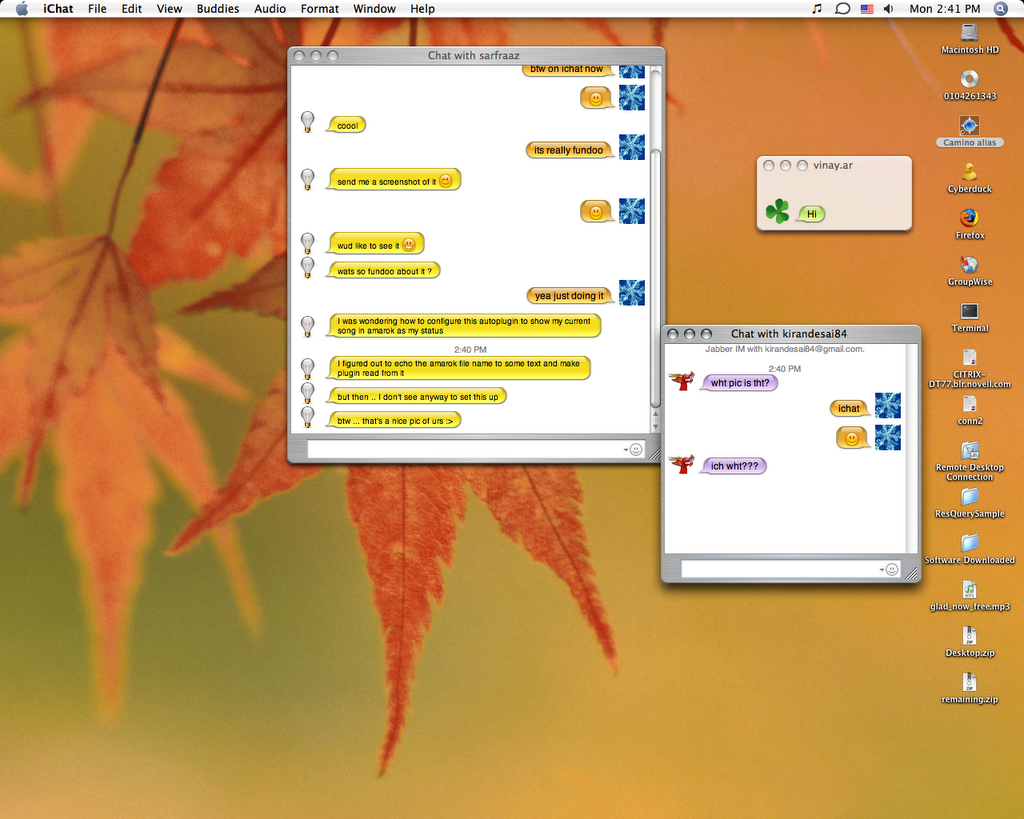
'n you just have to select 'Show current iTunes Track' from da drop-down menu...so unlike all da circus one has to do on gaim...'n very much similar to da 'Show current playing track' on google talk...now i know frm whr its 'inspired'... :D
yea i know iTunes is da only player on Mac...whr u have some dozen for linux...but still thts no xcuse for not providing with a gud interface to display da current playing song...
well not only this...Apple takes every small detail to another level altogether...be it changing da display pic or da cute way to show person's thinking while inputting text or da way incoming chat notifications are displayed...
think iChat's gonna be my default IM client for some days to come now... :)
Wednesday, August 16, 2006
How-to-Exaile
1st Step:
go to http://exaile.org/index.rb?command=download
2nd Step:
d/w Exaile 0.2b4 Source Tarball
3rd Step:
Check if your system has all da requirements specified. You should be having most...some which i had to install were-
> upgrade python-gtk2 to 2.8.6
> install python-ogg 'n python-vorbis plugins
> install mad 'n python-mad
> gstreamer 0.10 'n gstreamer0.10-plugins-good must already be present if u r using sled 10, if not install 'em. 'n gstreamer0.10-plugins-ugly for mp3 support. though hasnt worked for me so far. will update this post, if 'n when i get it to work.
Now tht you are done with da requirements, time for da final step.
> untar da source ball.
> cd to tht directory
> do ./exaile.........voila....you have exaile up 'n running :)
go to http://exaile.org/index.rb?command=download
2nd Step:
d/w Exaile 0.2b4 Source Tarball
3rd Step:
Check if your system has all da requirements specified. You should be having most...some which i had to install were-
> upgrade python-gtk2 to 2.8.6
> install python-ogg 'n python-vorbis plugins
> install mad 'n python-mad
> gstreamer 0.10 'n gstreamer0.10-plugins-good must already be present if u r using sled 10, if not install 'em. 'n gstreamer0.10-plugins-ugly for mp3 support. though hasnt worked for me so far. will update this post, if 'n when i get it to work.
Now tht you are done with da requirements, time for da final step.
> untar da source ball.
> cd to tht directory
> do ./exaile.........voila....you have exaile up 'n running :)
Subscribe to:
Posts (Atom)

